
DigitalOcean
Reimagining product documentation
Product Documentation was one of DigitalOcean's most visited sites, and the most outdated. As a design system request, the Product Documentation team asked that I help align the site visually with Blog and Community. However, the problem turned out to be more than cosmetic: Documentation sat on different foundations and was cut off from the rest of the product. So I took it further and explored what could be possible for the developer experience as a whole. Product Documentation should not feel like an island, but a cohesive experience tied into the fabric of DigitalOcean.
Product Documentation was one of DigitalOcean’s most visited sites, but it was also one of its most outdated.
As a design systems request, the Documentation team reached out for help aligning their site with the visual system established for Blog and Community. Unfortunately, that system had been created by designers who were no longer at the company, and there was no documentation explaining the decisions behind it.
As I began investigating, I discovered that the differences went beyond appearance. Documentation used a different grid, typography, and component patterns. More importantly, its navigation was disconnected from the broader DigitalOcean experience.
Rather than stopping at a visual refresh, I explored how Documentation could become a more cohesive destination within DigitalOcean’s developer ecosystem.
Overview
In 2021, DigitalOcean redesigned its Blog and Community sites, but Product Documentation never received the same treatment.
In 2023, about a year after joining DigitalOcean to work on its design system, I received a request from the Documentation team.
One of the technical writers reached out after seeing the systems work I’d been doing across the company.
Product Documentation team
Hello Lenora! It’s the Product Documentation team. We’ve been seeing the work you’ve been doing on the design system and thought if you ever had time to help a small team in need, the Pdocs team would love a helping hand.
This team is extremely small. We don’t have designers or engineers, but we’re a group of technical writers who aim to do what we can. I’m the most technical person on the team, so I built our Hugo site, but we badly need a refresh.
Check out Product Documentation and compare it with Blog and Community. Visually, it’s lagging behind, and we want users to experience the same level of quality they get across our other sites.
After meeting with the technical writer, I learned that Documentation was one of DigitalOcean’s most visited sites, despite having a small team responsible for maintaining it.
What initially appeared to be a visual alignment project turned into a four month exploration of the experience as a whole.
I reconstructed the foundations behind Blog and Community, audited Documentation’s existing system, proposed a shared navigation approach, and developed three concepts for reimagining how developers navigate technical information.
I also explored appearance modes and a supporting token system that could eventually extend beyond Documentation.
The project was implemented after I left DigitalOcean. Although the final experience didn’t include everything I proposed, several ideas are visible in the current site.
Role
I was a Senior Product Designer II working on DigitalOcean’s design system.
Part of my role involved temporarily joining different product teams to help establish or extend their design foundations. Once the work was ready for implementation, I would move to another area that needed support.
Before Documentation, I had worked on shared components for product creation flows, the permissions framework, and granular access controls.
Documentation was a little different.
The team consisted primarily of technical writers, without dedicated product design or engineering support. The technical writer who contacted me had also built and maintained the Hugo website.
I joined as the sole designer and led the experience redesign over four months.
My responsibilities included auditing the three sites, reconstructing the undocumented visual foundations, identifying necessary shared components, exploring three experience concepts, and designing the selected direction across the homepage and article experience.
I also established the design plan, milestones, stakeholder reviews, and regular checkpoints to keep the work aligned with the team.
Problem
Moving between Blog, Community, and Documentation introduced abrupt changes in typography, layout, navigation, and visual language.
The original request was visual alignment. My design manager encouraged me to take the exploration further and imagine what Documentation could become without constraints.
After auditing the sites, I identified four problems:
- Inconsistent layout foundations. Documentation used a different grid system, content width, and spacing conventions than Blog and Community, creating noticeable inconsistencies across the experience.
- Outdated visual language. Documentation relied on older typography, illustrations, hero treatments, and component styles that no longer aligned with DigitalOcean’s evolving brand.
- Disconnected navigation. Developers entering Documentation lost access to the shared navigation that connected Blog and Community to DigitalOcean’s products, services, and account experiences.
- Disconnected publishing architecture and shared components. Documentation was built and maintained separately using Hugo, with its own styles and components rather than the shared components used by Blog and Community. As DigitalOcean’s design system evolved, updates weren’t automatically reflected in Documentation, making it harder to maintain consistency across all three sites.
Take a look at the Blog and Community site
Although they use different visuals, they are using the same font, visual language, and grid system, which makes the products feel cohesive.
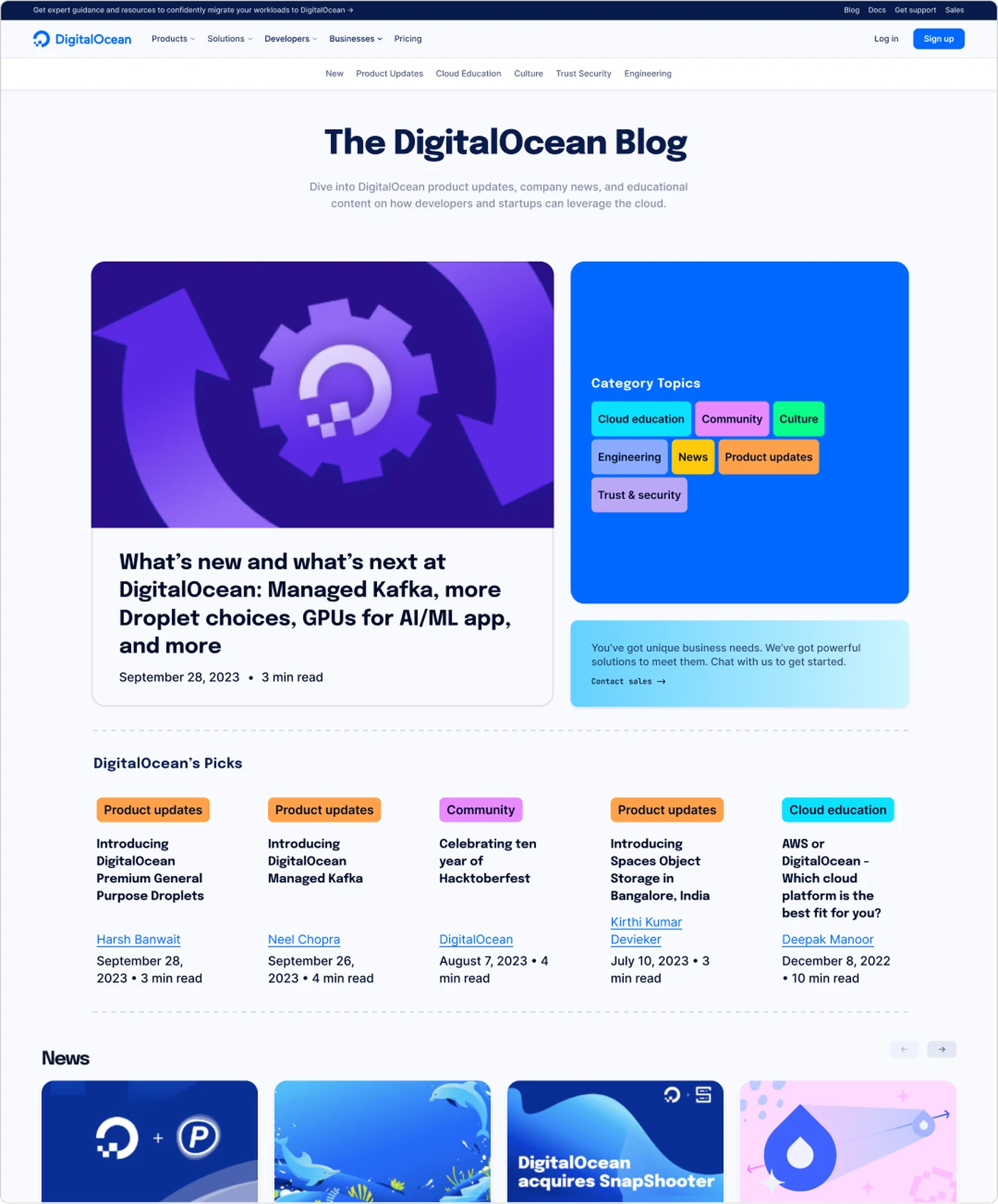
Blog
Redesigned 2021
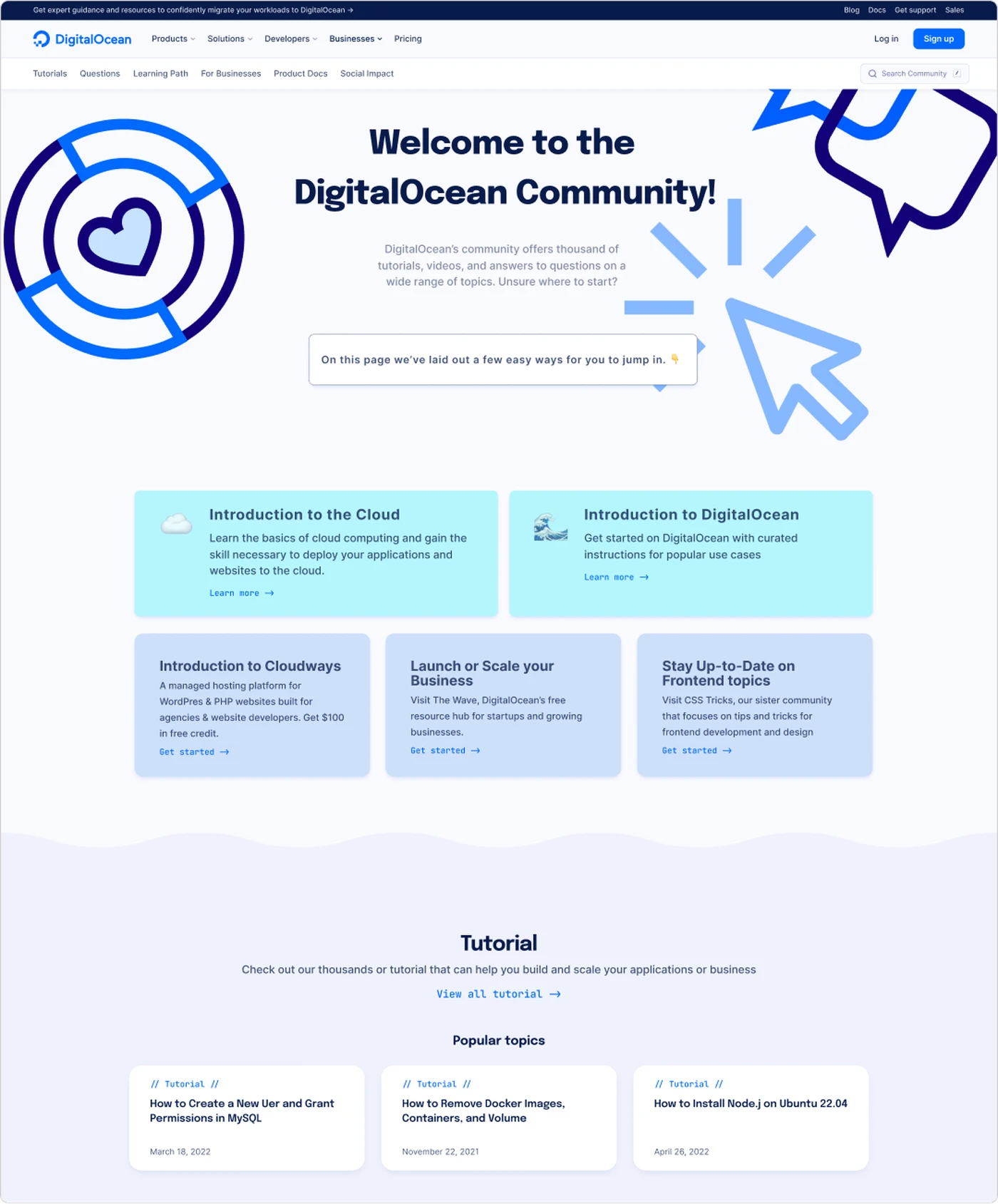
Community
Redesigned 2021
Then there’s Documentation
The documentation site looked and behaved differently.
Its homepage featured a Docs wordmark, a single row of navigation links, a blue banner, popular articles, four product categories, and a lengthy changelog.
The content was useful, and the site accomplished its basic purpose.
But the experience felt separate.
The grid was narrower, the typography was different, and the homepage functioned more like an archive than a destination designed to help developers find their way.
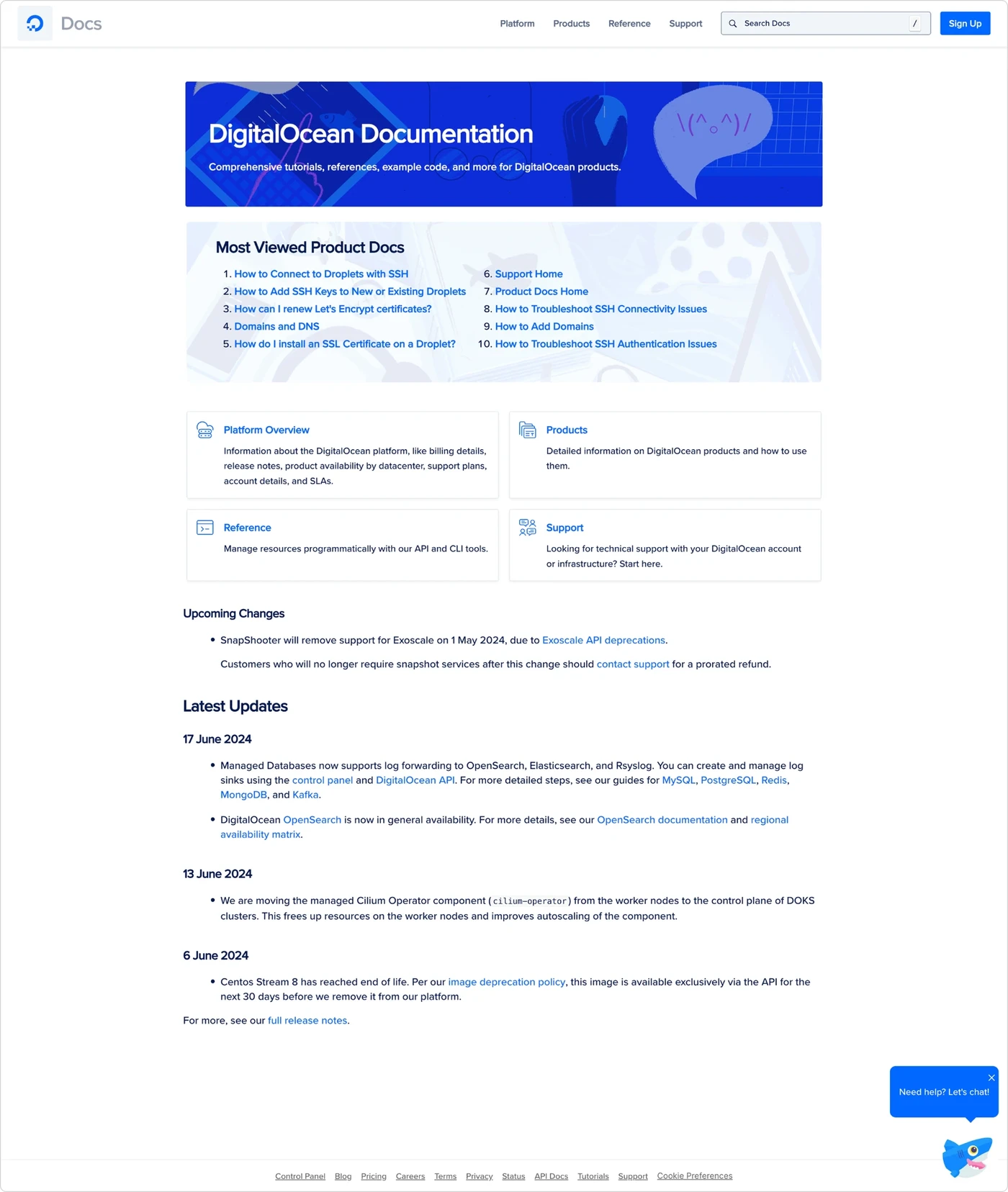
The navigation was the most consequential difference.
Blog and Community both provided ways to reach Documentation. But once developers arrived, the broader DigitalOcean navigation disappeared.
Both sites could send developers to Documentation. Documentation couldn’t provide the same path back.
A visual refresh wouldn’t fix that.
The opportunity was to bring Documentation into the same connected experience while reconsidering how it could help developers discover and use technical content.
The Solution
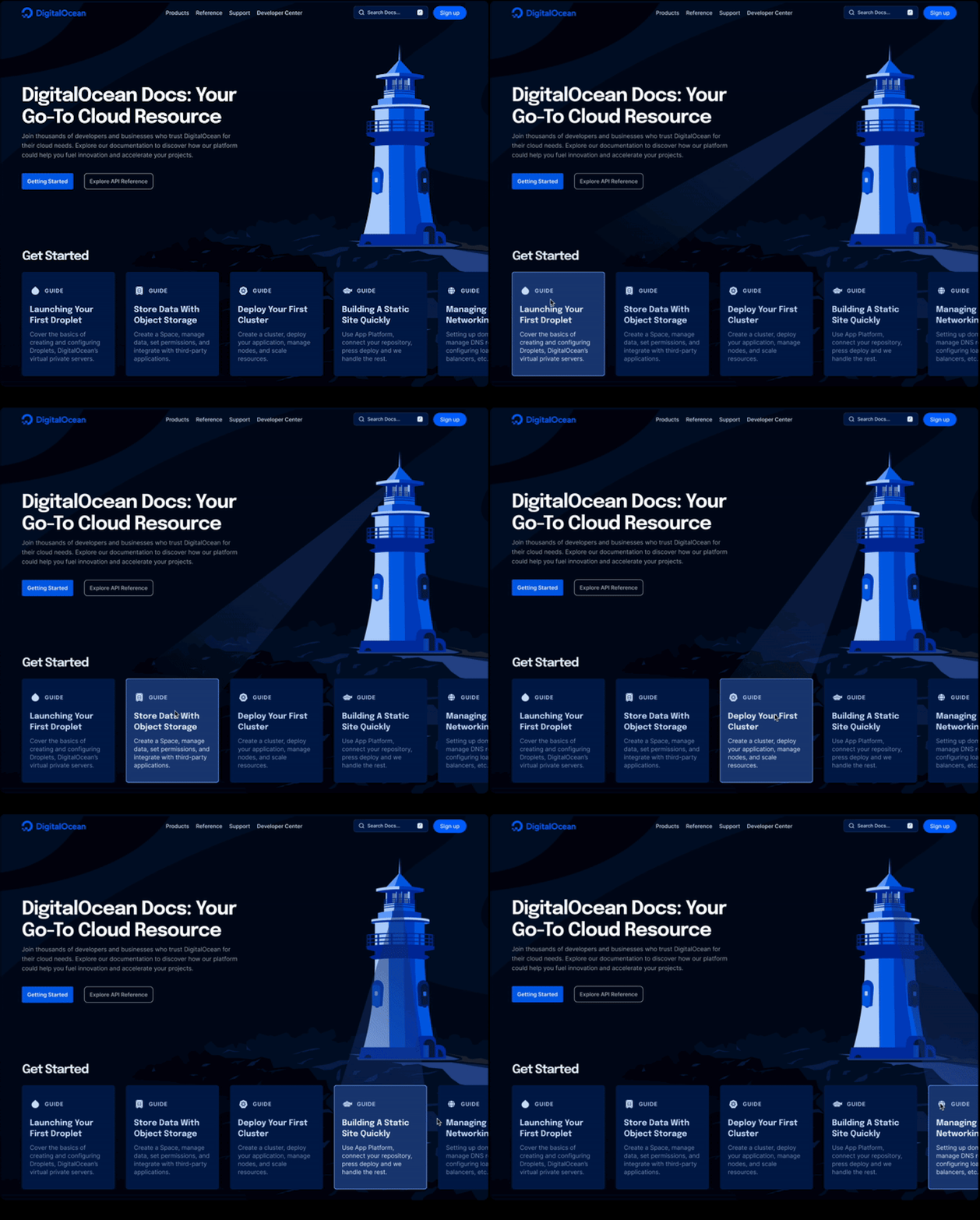
Before I get into the process, let’s take a look at the final proposal. In a Next.js app, I created a prototype of the final experience to tie this collaboration in a bow. It is not the page that is live at DigitalOcean today, but it’ll give you a good sense of what I proposed.
The redesign begins with a shared navigation structure.
Developers can move between Blog, Community, Documentation, and the broader DigitalOcean platform without losing access to the same global navigation.
For the experience itself, I leaned into DigitalOcean’s oceanic visual language and introduced a lighthouse as the central concept.
The lighthouse represents guidance.
Different developers arrive with different levels of experience and different needs. Rather than forcing everyone through the same path, Documentation should help them find the information they’re looking for.
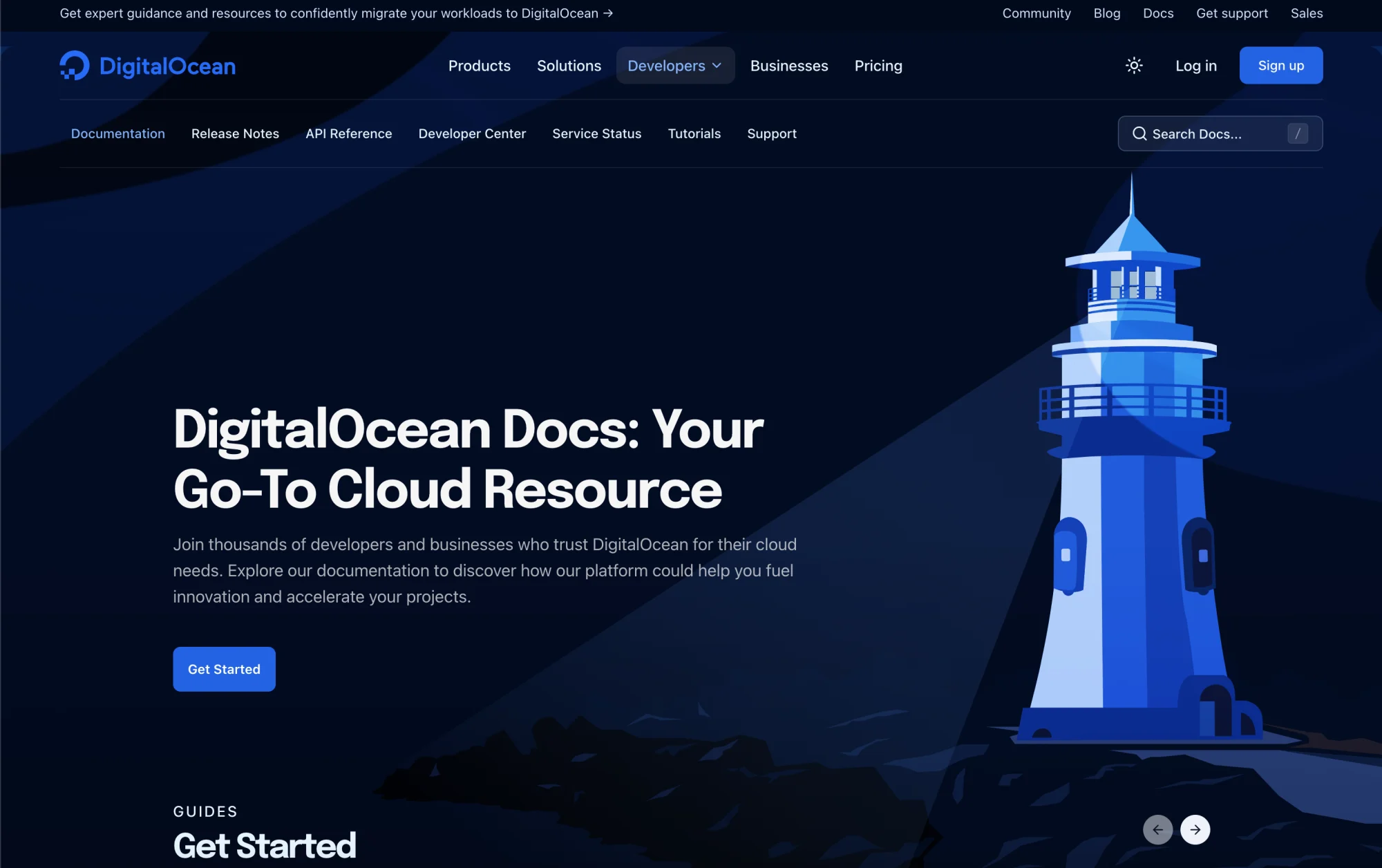
In the darker appearance mode, the lighthouse beam responds as visitors explore the guide cards, illuminating the direction they’re considering.
The article experience follows the same principle through persistent navigation, expandable steps, and commands that can be copied directly into a developer’s workflow.
Hover a guide card to see a cool interaction, and press the sun button in its navigation to see light mode.
The Process
When I temporarily joined a team to support systems work, I started by establishing expectations.
I wanted everyone to understand what I was investigating, why it mattered, when decisions needed to be made, and what the team could expect from me before I moved to another assignment.
For Documentation, I established a four month design plan with milestones, regular checkpoints, and stakeholder reviews.
| Month | Focus | Key milestones |
|---|---|---|
| September | Discovery and alignment | Kickoff, site audit, findings review |
| October | Research and exploration | Competitive research, understanding usage, three concepts, stakeholder direction |
| November | Detailed design | Selected direction, reusable components, design foundations, final proposal |
| December | Prototyping and handoff | Interactive prototype, documentation, final presentation |
The plan created a shared understanding of the work and gave the Documentation team opportunities to provide input as the direction evolved.
It was especially important because the team didn’t have dedicated design or engineering support.
I wanted the work to be collaborative rather than delivering a finished redesign that the people maintaining Documentation had never participated in shaping.
Reconstructing undocumented decisions
Every designer has joined a team where previous decisions were never written down, and the people who could have talked you through them no longer work at the company. With the visual system for Blog and Community, there was no documentation and no written decisions, not even a Figma file. The first thing I needed to do was audit the experience by measuring and dissecting the two sites until the system underneath was legible again.
Font
PDOCs used Inter as its primary typeface, while Blog and Community had moved to Epilogue for a more editorial feel.
Visual language
There were clear differences in hero treatments, content card styling, and use of illustration on top of that.
None of this is visible one page at a time. It accumulates, and what it accumulates into is the feeling that you have left the site. So the foundations had to be settled before anything new was designed on top of them: grid, type, spacing, component language.
Grid system
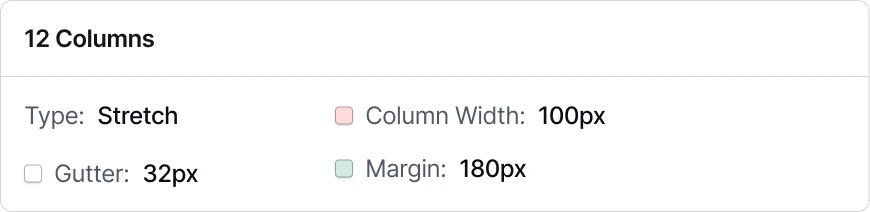
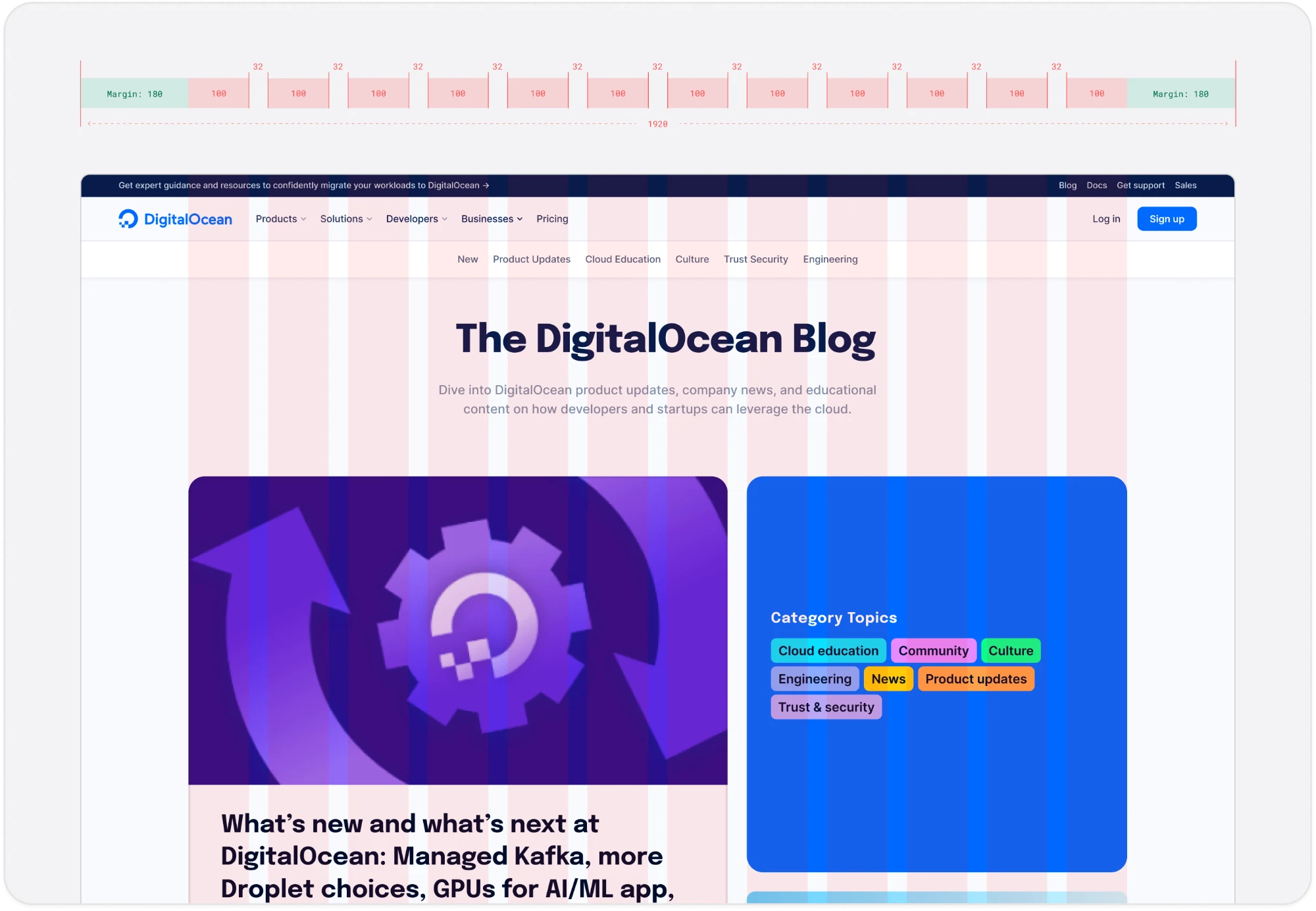
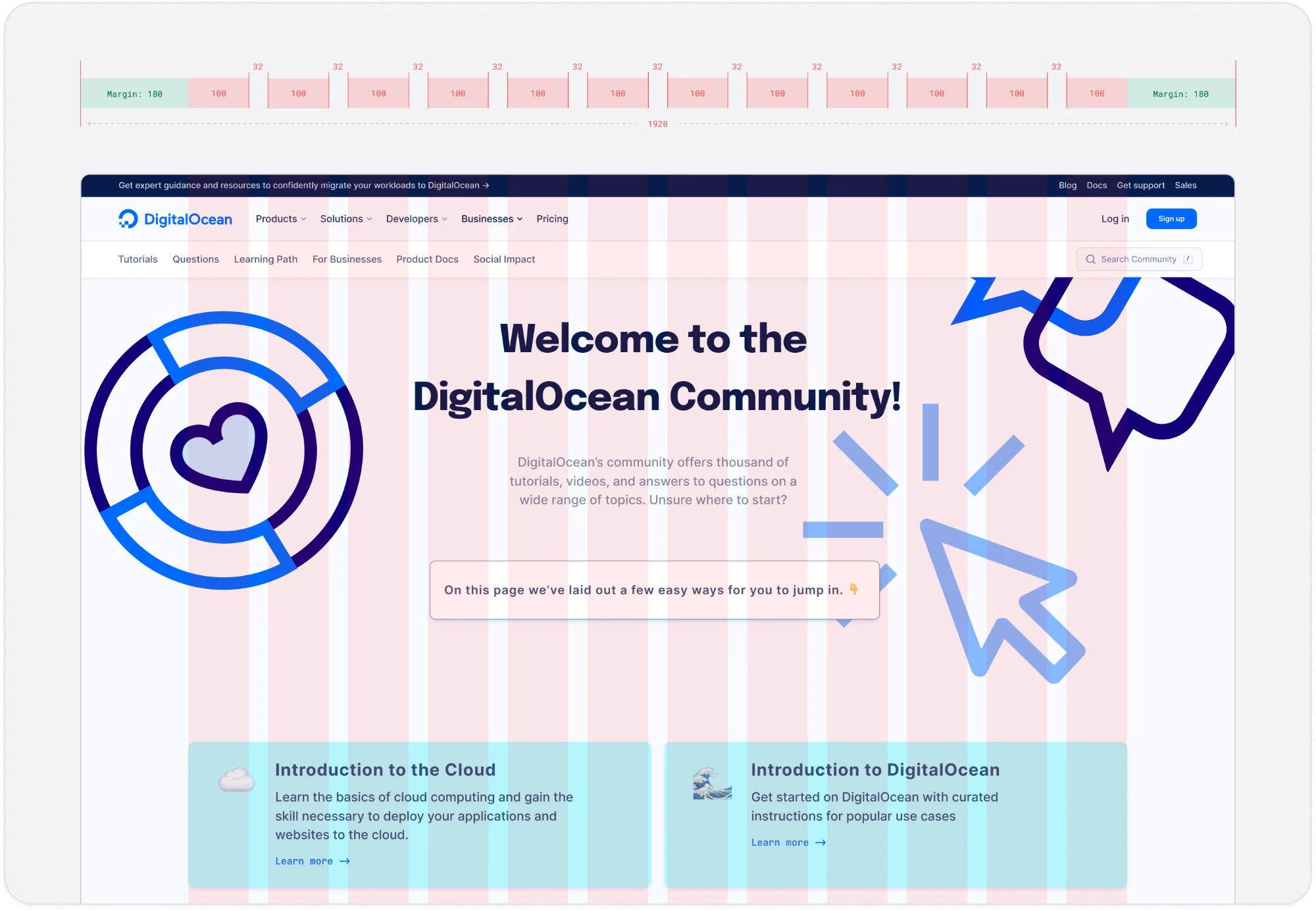
Blog and Community used the same grid system. The grid is made up of 12 columns, 100px each, with 32px gutters inside a 180px margin.
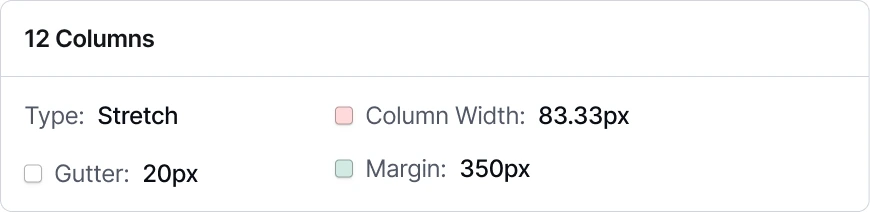
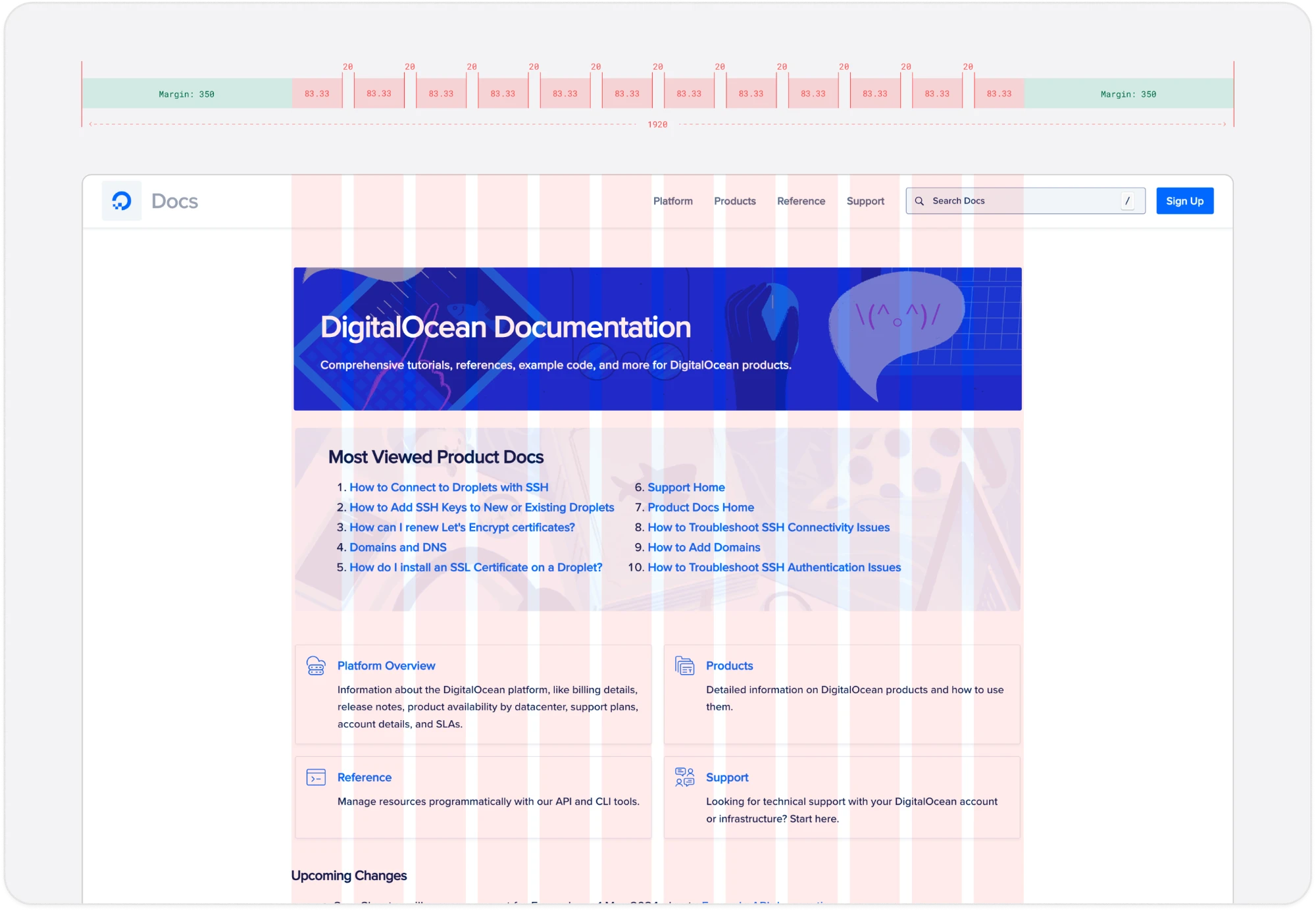
The documentation site sat on a completely different grid system. The grid is made up of 12 columns, 83.33px each, with 20px gutters inside a 350px margin. It was on a different one, which is harder to notice.
That made adopting the shared grid more than a cosmetic fix. Widening the content band, and mimicking the hero, bento box, and column spans on the page, was all low-hanging fruit to get the page aligned.
The Navigation Documentation Never Got
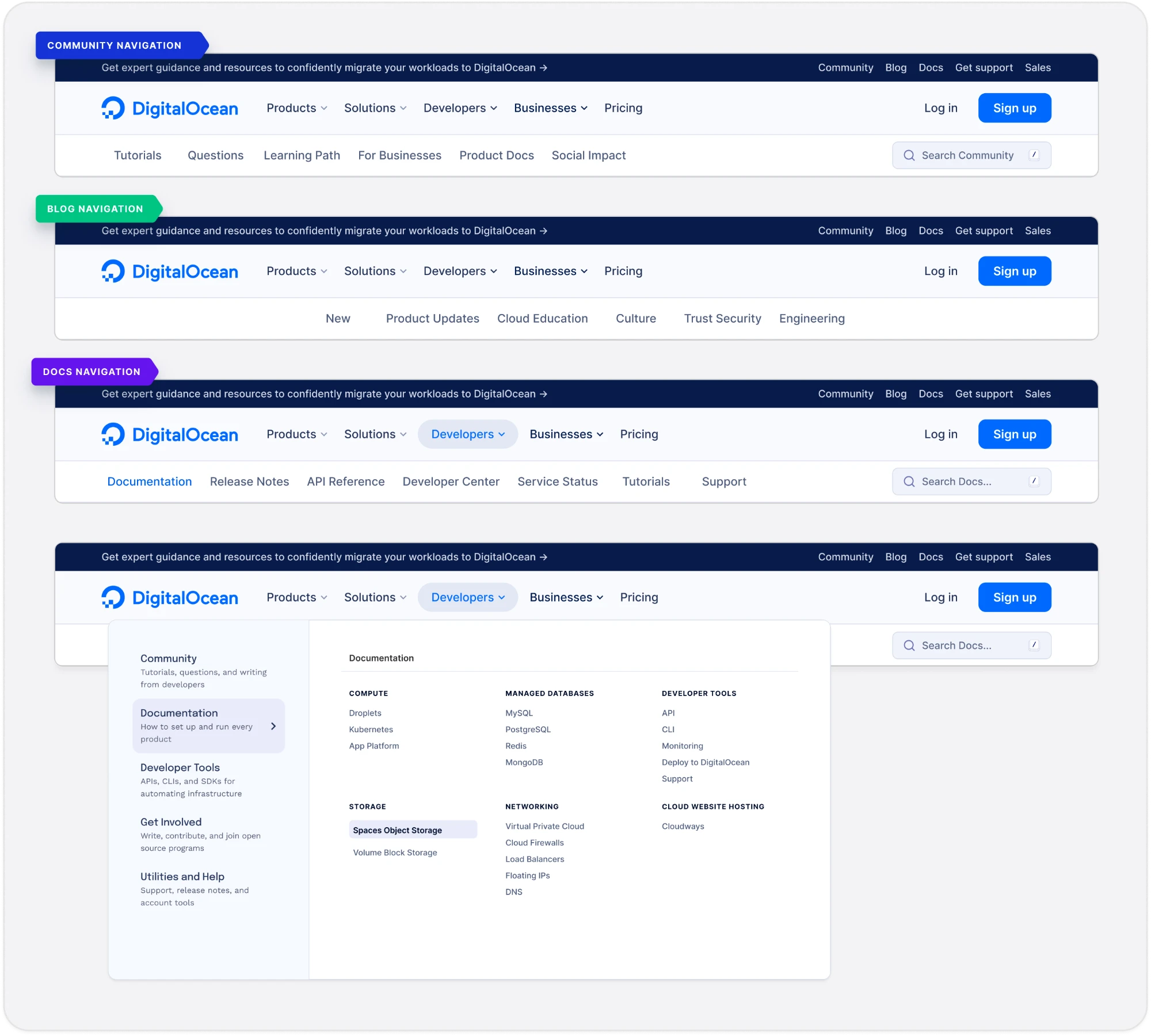
The navigation was the clearest piece of shared structure to inherit. Blog and Community both run the same component, and it has three parts. A top hat across the top. The main navigation underneath it, carrying the DigitalOcean wordmark, the company menus, Log in and Sign up. Then a sub-navigation for the sections that belong to that site.
The top hat is the part that is easy to read as decoration and is not. It carries whatever DigitalOcean needs every visitor to see right now: a promotion, a resource, an active outage. Its value depends entirely on being everywhere. A message that reaches some sites and not others is not a message, it is a gap, and the person in the gap has no way to know they are in one.
The Community navigation
All three rows are available. The top hat and the main navigation are the company’s and never change. The third row is Community’s own: Tutorials, Questions, Learning Path, For Businesses, Product Docs, Social Impact, with a search scoped to Community rather than the site. Note what is sitting in there already: a link out to Product Docs.

The Blog navigation
All three rows are available. Only the third changes, to the categories a reader of the Blog would want: New, Product Updates, Cloud Education, Culture, Trust & Security, Engineering. No search, because a blog is browsed rather than looked up.

The Documentation navigation
All three rows are unavailable. The component is completely absent. The navigation for the documentation site has one level, with a Docs wordmark where the DigitalOcean wordmark belongs, four links of its own, a search and a sign-up button. If the user navigates here, there is no way to get back to previous parts of the DigitalOcean site.

The main connector is gone, the top hat with the main navigation row. Without the main navigation there is no route back to Products, Pricing or an account. An outage notice would run on Blog and Community and stop at the one destination a developer hits when something has already gone wrong.
Adjusting the navigation for the documentation site
So I rebuilt the audit with Documentation in it. The same top hat, the same main navigation, and a third row that finally belongs to Documentation.
Rethinking the Experience
At this point in the journey, the foundations were decided and now it was time to navigate the details. Getting the foundations right would make Documentation consistent, but that’s just half the battle. It would not make it any easier to use. At this stage, it was time to decide the actual experience of documentation for developers.
Starting with DigitalOcean’s core theme
DigitalOcean leans hard on its oceanic theme, and I did not want documentation to be the one site that opted out of it. So I set myself a constraint: find something that gives the oceanic vibes and could also create a double metaphor for product documentation.
I went back through old commissioned work and illustration the company already owned, and found a small red boat pitching in a storm with a lighthouse in the distance.
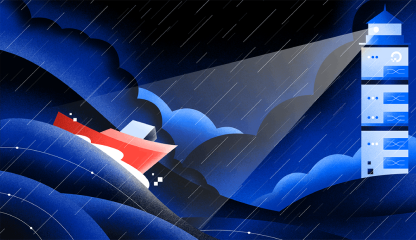
It reframed the problem for me. Some developers arrive at product documentation after being “lost at sea.” Developers go to Product Documentation because something is broken, or because they cannot find the thing they need. Some developers are more advanced, so they need to be pointed to advanced topics, while other developers may need a bit more hand holding. How do we narrate that journey right within the ethos of the documentation site itself?
This metaphor became the design principle I designed against: the documentation site should be a lighthouse for developers. It is supposed to light the path forward, and if it can’t, it helps you easily reach out to support. This principle is what gave the three directions their shape: each one is a different answer to how much navigating or help the developer needs.
Understanding how developers use documentation
Before exploring new directions, I spoke with approximately 30 developers and read through discussions on Reddit and Quora to understand how they actually find technical information.
A recurring pattern was developers using search to reach a specific page rather than starting from a homepage. That challenged the assumption underneath the original request, which was that redesigning the homepage would meaningfully improve the experience.
It also raised the larger question: how could Documentation support developers who needed guidance without slowing down the ones who already knew exactly what they were looking for?
That question is what gave the three concepts their shape.
Concept 1: Library of Knowledge with Embedded Guidance
Documentation as a library is close to the experience that’s already there. This proposal was created in an effort to create more guidance for developers new to cloud computing. Currently, developers would either choose most popular doc pages, or browse by product. Advanced developers would use search. Our documentation site created a gap by not helping on-ramp newcomers. Our guides can be a part of the experience that helps all developers get started with the basics; however, if you need to search you can, and if you’d rather browse by product you can. If you don’t know what a droplet is, the guide walks you through the experience, versus thrusting you into a wall of text about droplets and implementation when you are still trying to figure out what it is and why you would need to use it. “Droplet” is not an industry term, so learning the DigitalOcean nomenclature is a huge miss in our current documentation.
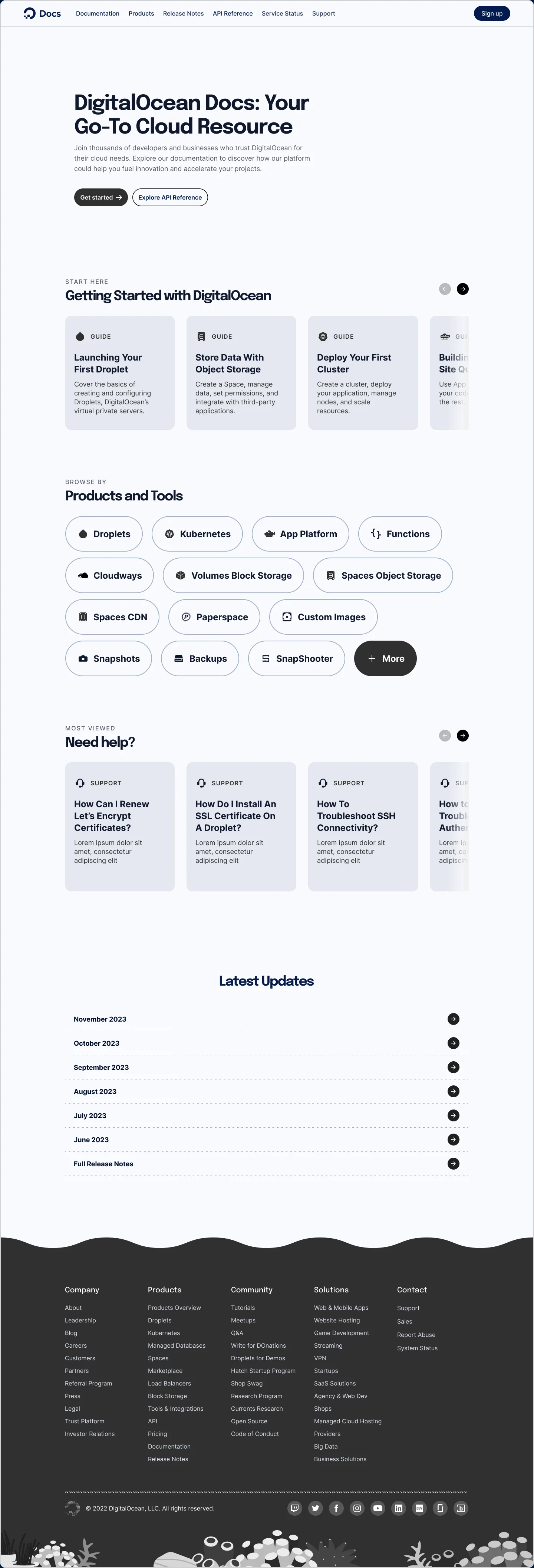
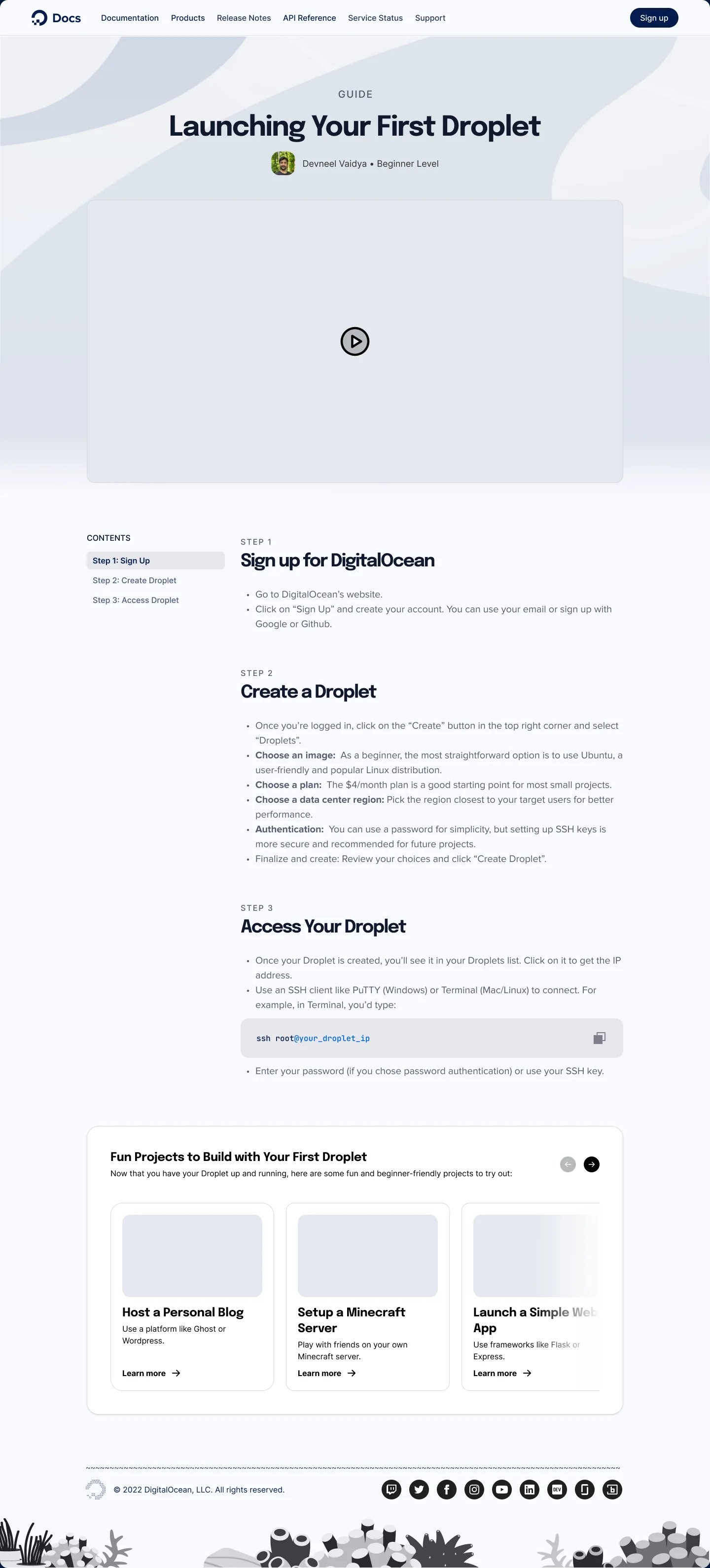
Click the first guide card to follow the path, then use Back. Both screens scroll.
Concept 2: Shape-Shifting Playground
The Shape-Shifting Playground was in an effort to completely dismantle product documentation as we know it. It takes the search finding at face value: if developers rarely begin at a homepage, the homepage should not be the thing standing between them and the content.
The Shape-Shifting Playground allows the homepage to continue to exist to keep the experience similar to what it is now; however, the entire UI shape shifts as soon as you search, becoming the browsing experience for whatever you search.
Each row becomes a catalog of content ranging from the Most Visited doc pages, to “Getting Started” content focused on beginners, and then grows with complexity as you scroll down. Each row categorizes by complexity.
Although this experience drew the most support, it was also seen as the most complex.
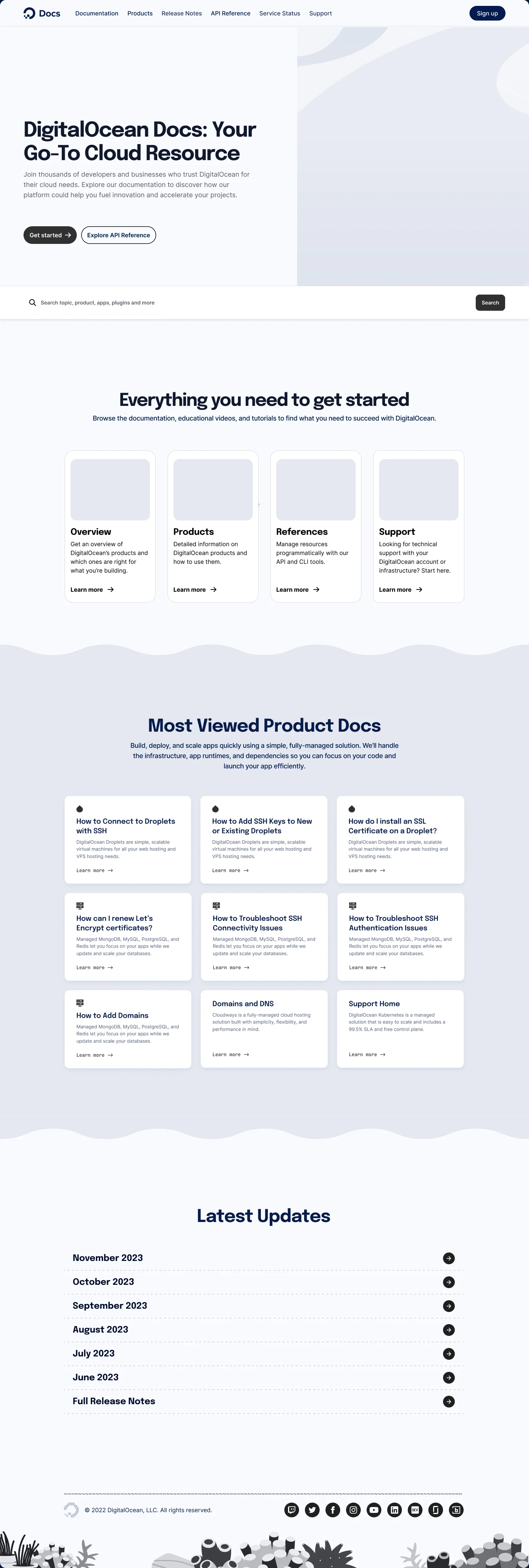
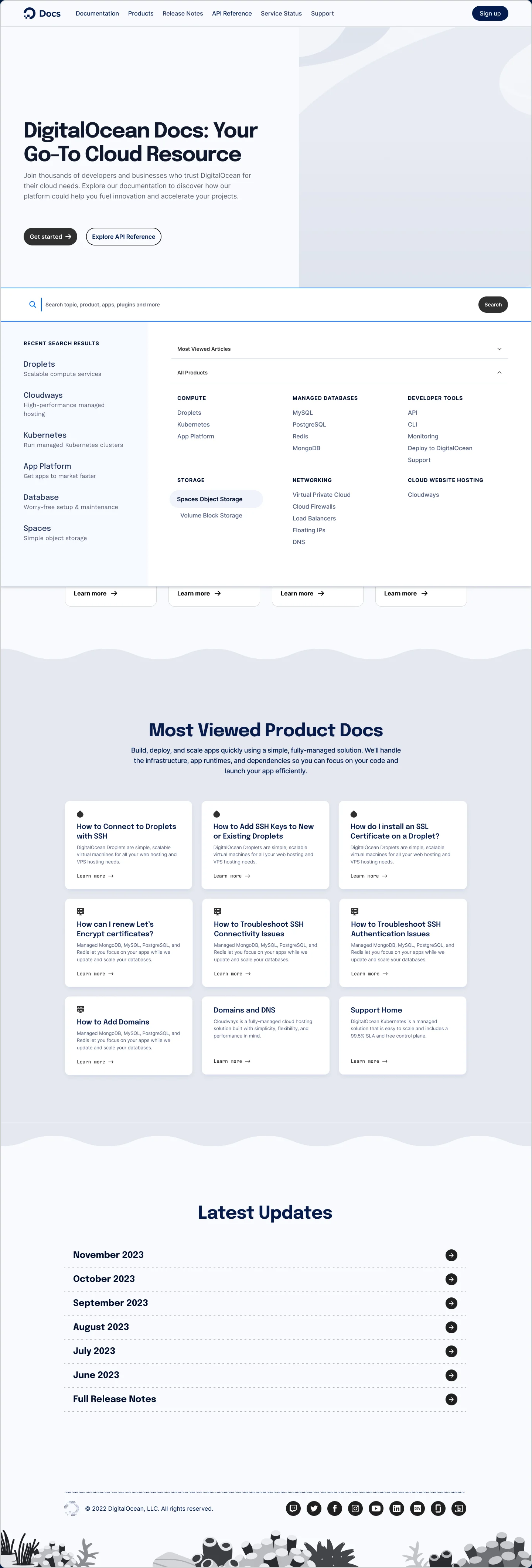
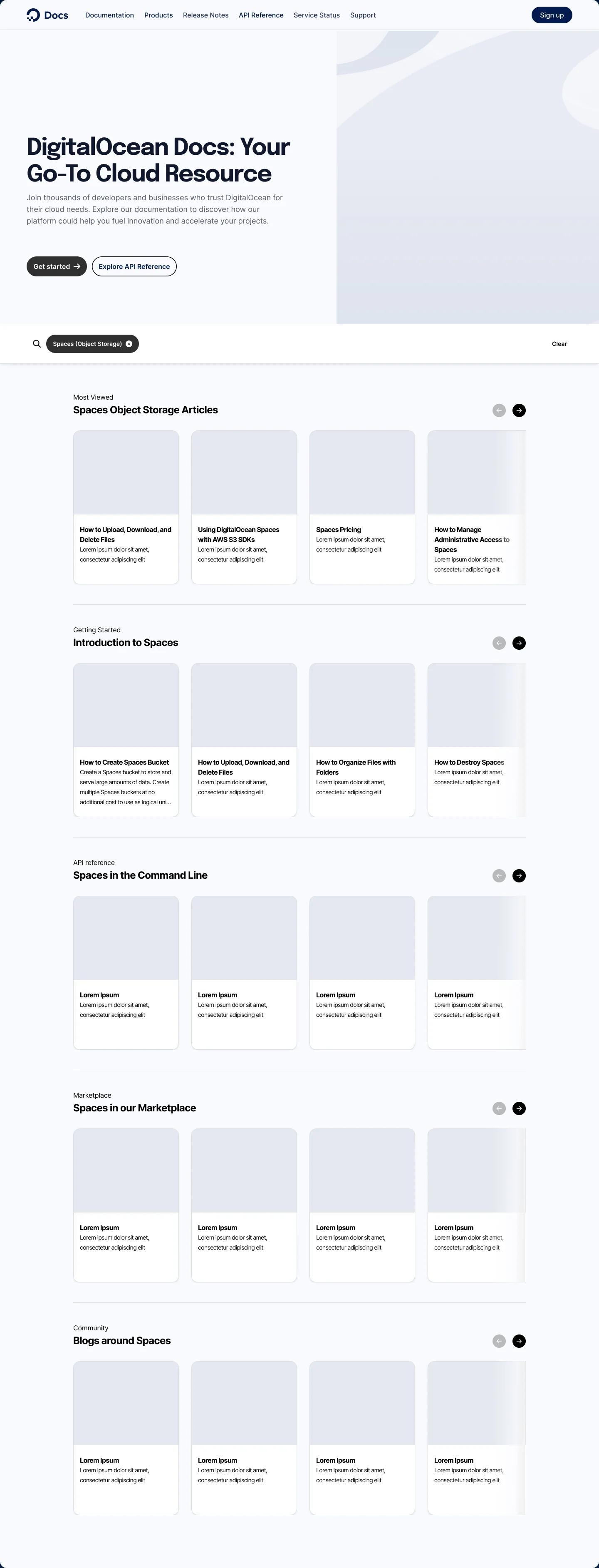
Click the search field, pick Spaces, and watch what happens to everything below it. Then take the filter back off.
Concept 3: Half Laboratory, Half Study Room
The last concept pushed the bounds even more and totally upended product documentation. Instead of the product documentation site just being a reference, I wanted to explore a concept of gamifying your learning experience. Reference on one side, practice on the other. Mini learning videos where you can learn in an approachable way, or, if you prefer to read technical content, you can. This concept treats documentation as a place you learn rather than just a place to read technical content.
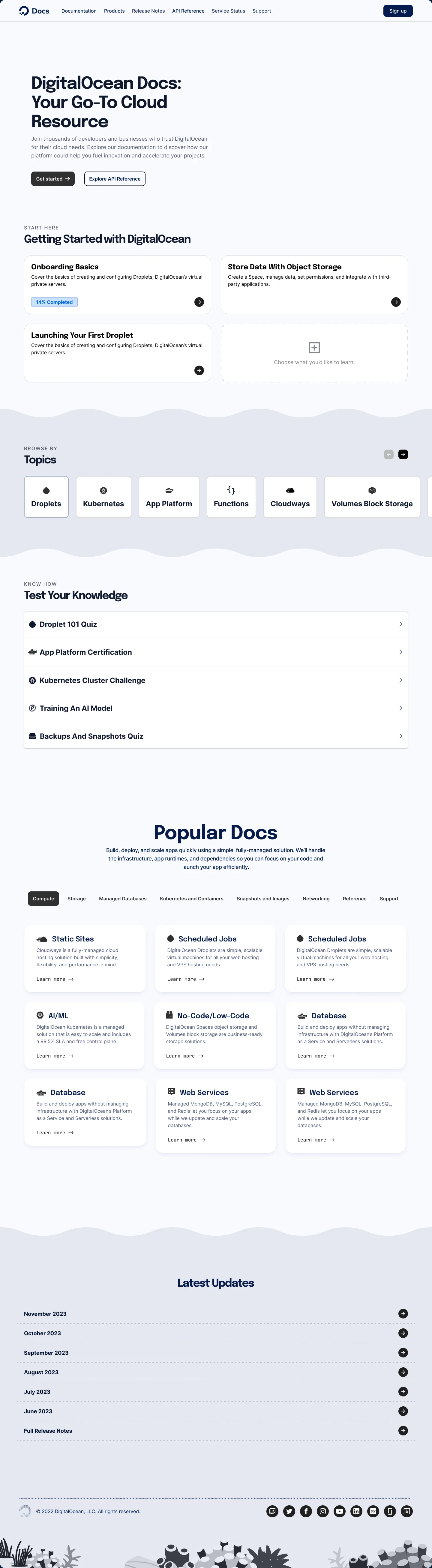
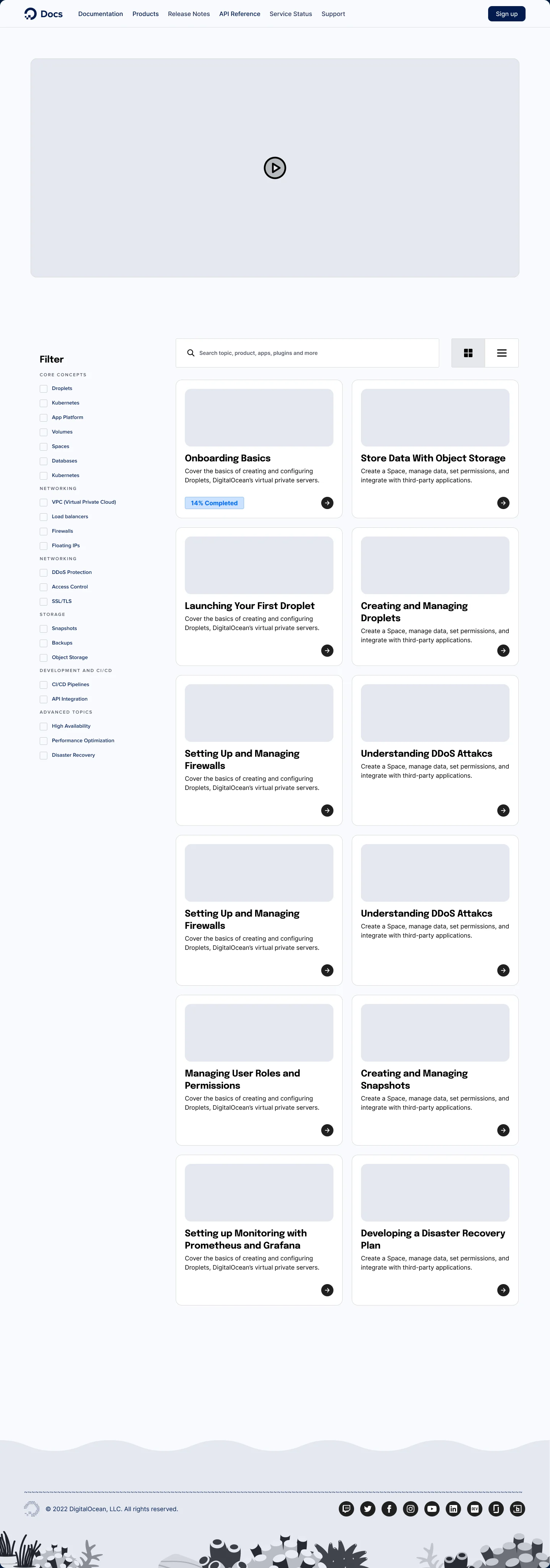
Click the empty card to open the shelf. Both screens scroll.
The Direction We Chose: Library of Knowledge
I presented the three directions to product, content, brand, and research stakeholders. Shape-Shifting Playground drew the most support in the room. The call went to Library of Knowledge anyway, and it was the design manager’s and the technical writers’ to make.
The decision came down to continuity and feasibility. Concept 1 was drawn to evolve the existing experience without requiring an entirely new publishing model. Concepts 2 and 3 explored what Documentation could become with greater investment.
Library of Knowledge kept the familiar ways of finding technical information while adding guidance for developers still learning DigitalOcean’s products. It was the closest of the three to what Documentation already was, and the team wanted it to stay recognizable to the people already using it.
That was the intention of Concept 1. To be something that can be implemented right now, versus aspirational. The decision was not simply about picking the least ambitious concept. It was about choosing an experience a team of three could realistically carry forward, while keeping the larger opportunities on the table.
Final Design
Extending a system investment that already existed
Once the direction was chosen I started working through the details. I had just finished the token system for dark mode inside the product experience, and Documentation was a chance to put it to work on a second surface rather than invent a separate color system for one site.
At the time the entire DigitalOcean experience was light mode only, and that includes Blog and Community. Proposing modes here was a long shot, but it was a clear moment to attach work the platform needs and would not get funded on its own. If documentation shipped with modes and the tokens under them, the product had a working reference instead of a proposal.
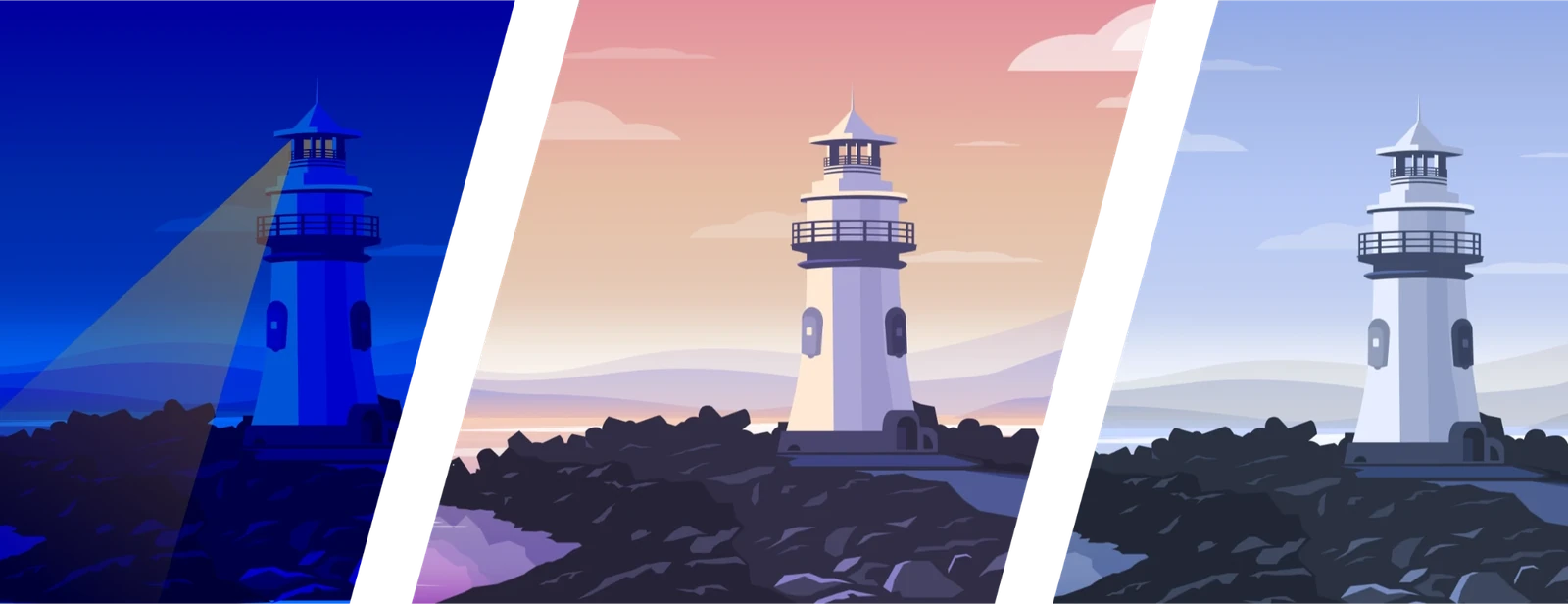
So I drew four passes rather than one. Light and Dark as the primary modes, then Day and Dusk, to show how little a token system asks of you to add another variation: the layout does not change, only the values do. The lighthouse illustration is built on the same tokens, so it moves with the interface rather than needing a hand-drawn version per mode.
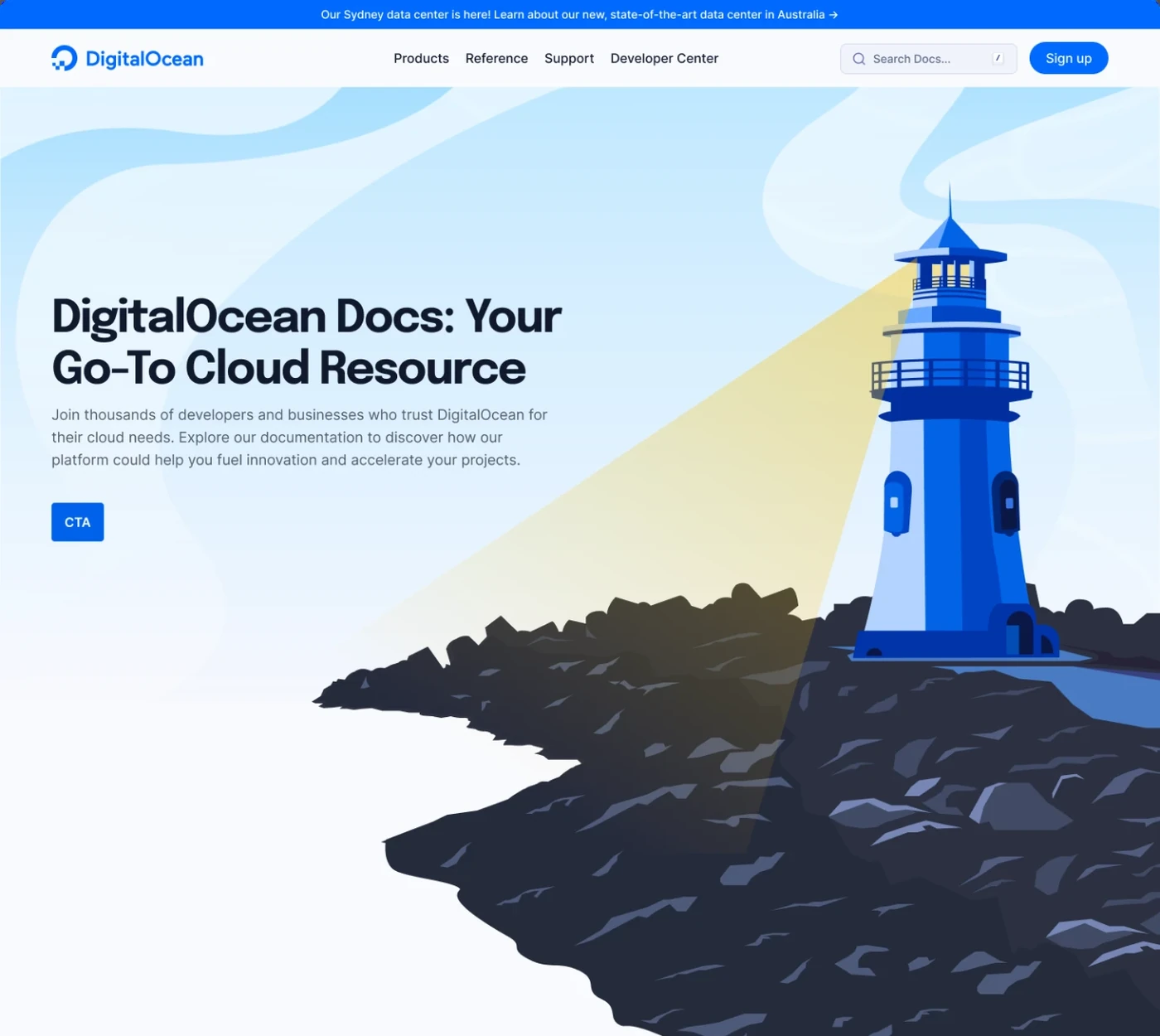
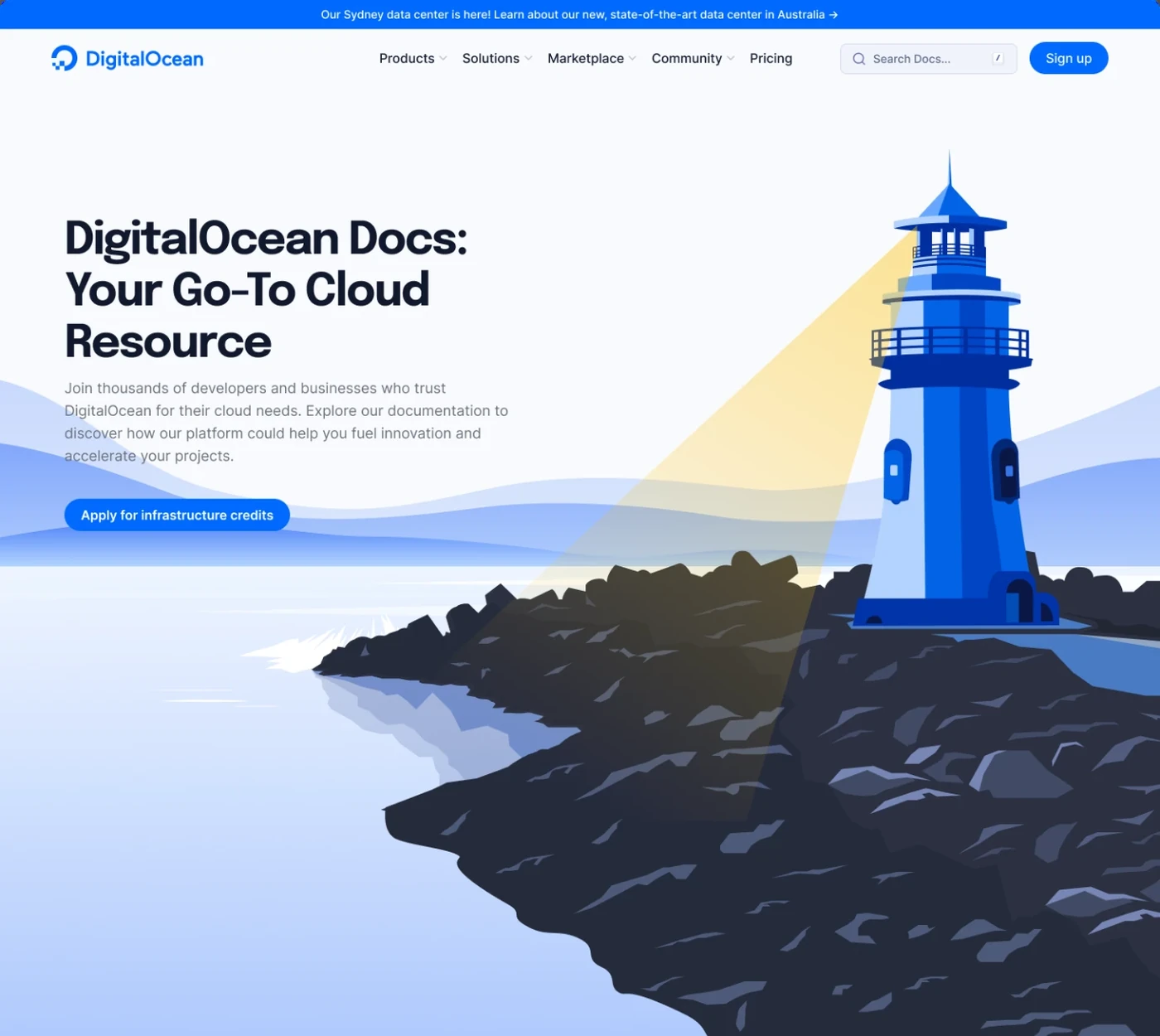
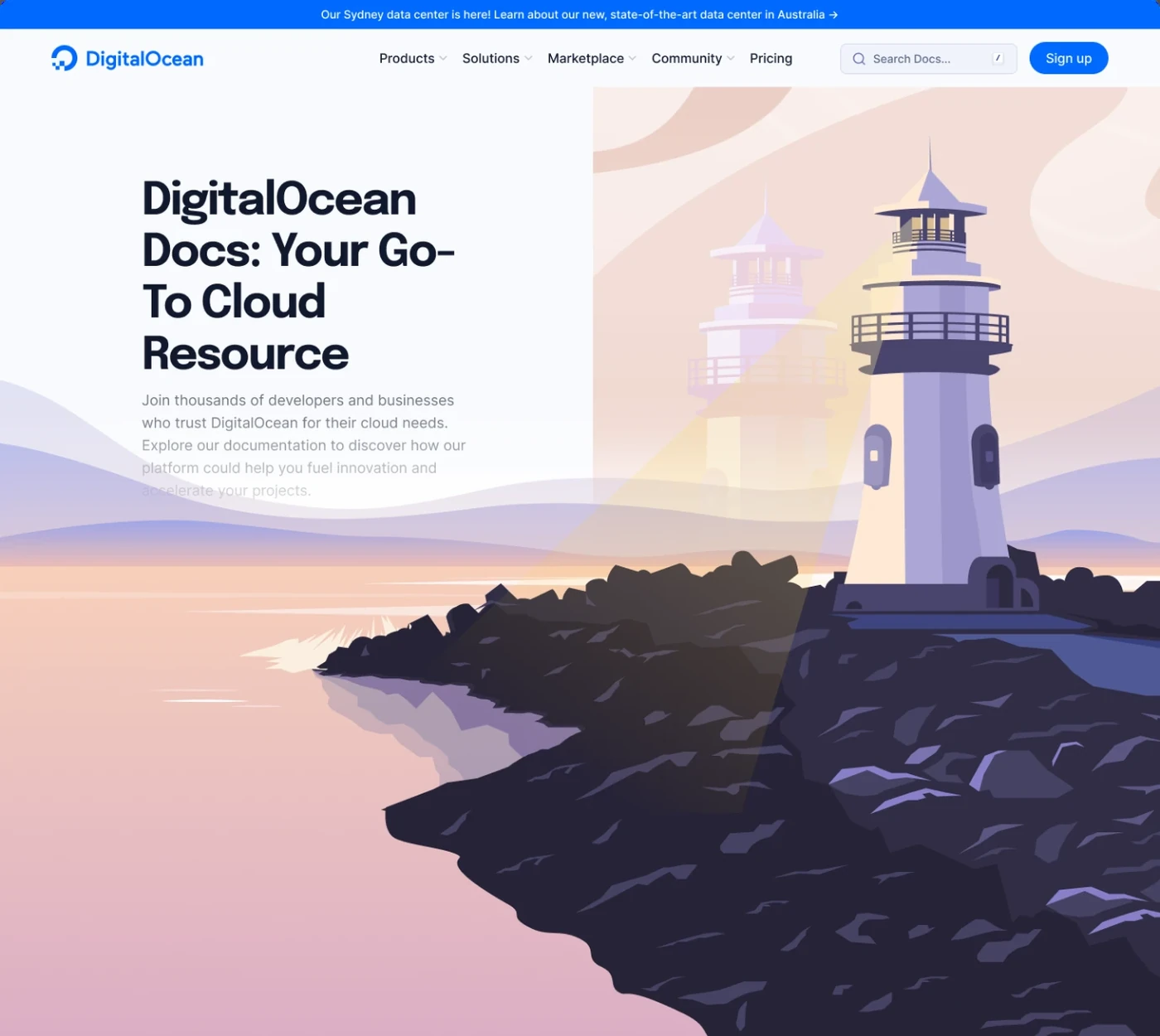
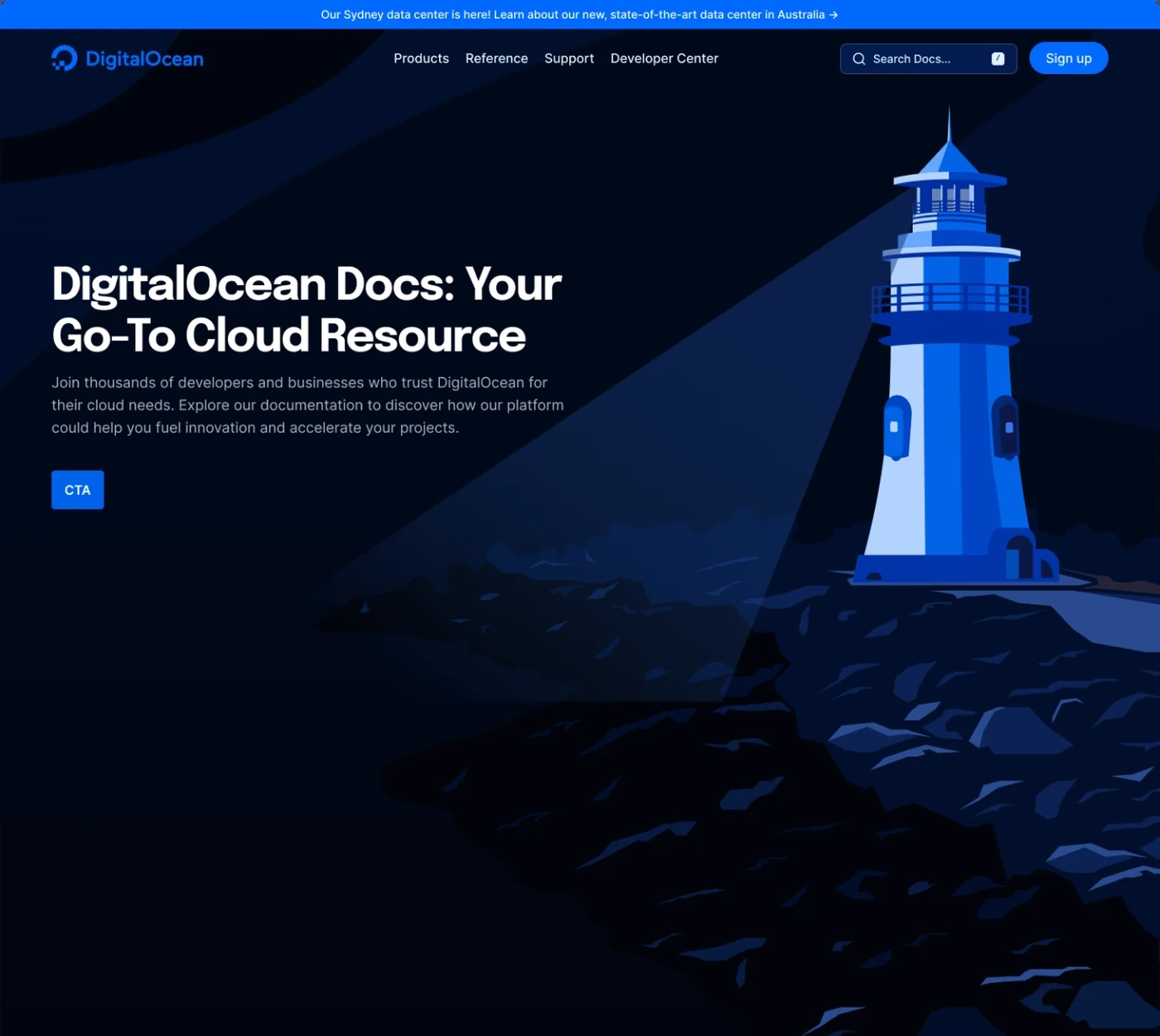
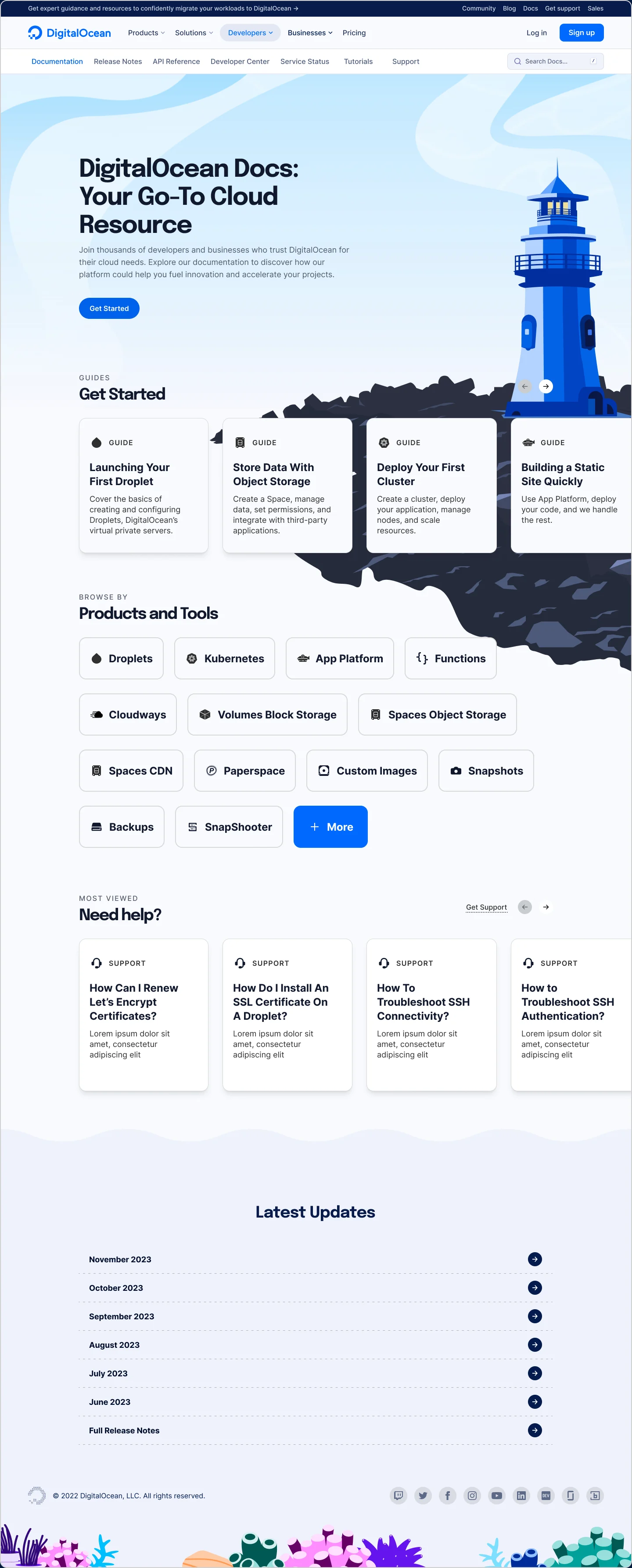
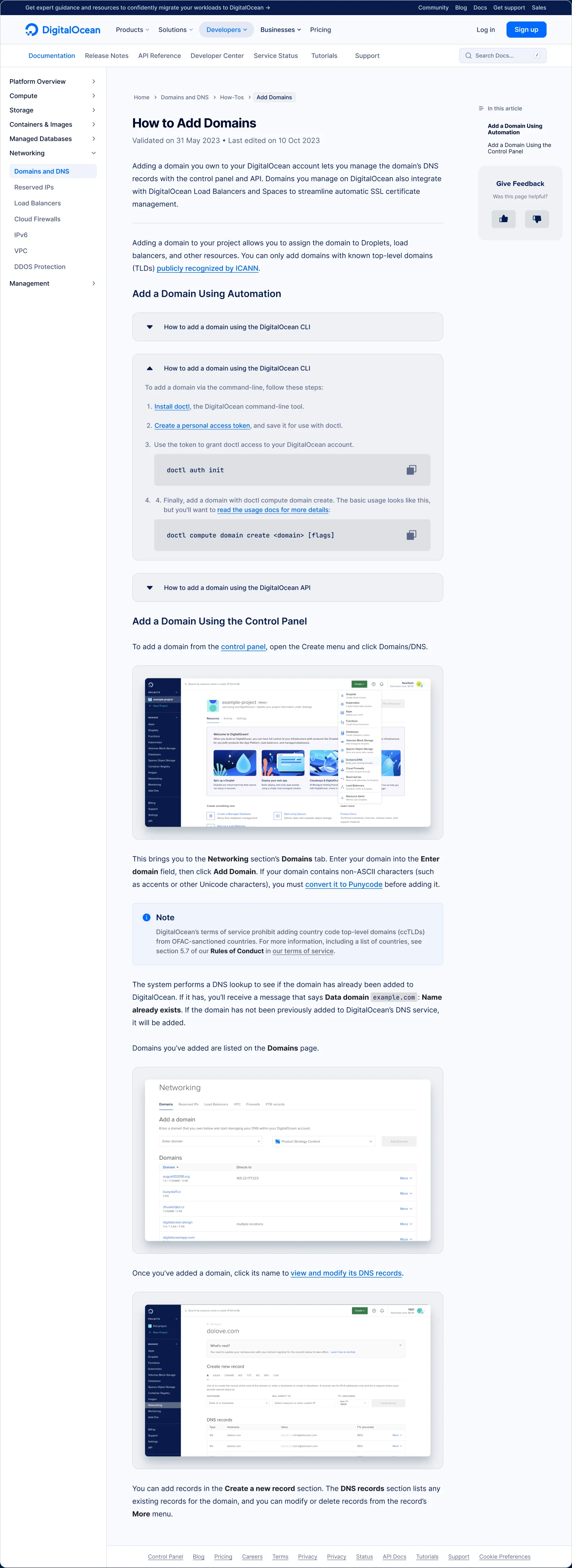
Open a card to see the article template, which is where nearly all the traffic lands.
What Shipped and What Did Not
What shipped
Product Documentation was built using Hugo, a static site generator.
After reviewing the designs, the technical writer responsible for the website explained that the team was working with restrictive templates and had limited ability to customize them.
Some of the proposed changes could potentially be implemented within the existing system. Others, particularly the shared navigation and richer interactions, would require engineering support that the Documentation team didn’t have.
The team was enthusiastic about the direction, but there was a difference between what we wanted the experience to become and what they could realistically build.
My four month assignment eventually ended, and I moved on to another design systems project.
The proposal remained with the Documentation team.
In 2025, approximately two years after the project, parts of the redesign were implemented.
By then, I had left DigitalOcean and wasn’t involved in the implementation decisions.
The live experience isn’t a reproduction of my original proposal, but several elements are recognizable.
- The lighthouse is now part of the homepage.
- The site supports light and dark modes.
- The oceanic theme extends into the visual details, including the wave treatment at the bottom of the page.
Developers can also browse documentation by product, preserving a familiar way of finding technical content.
These changes reflect parts of the visual and content direction I explored, although I can’t independently establish which implementation decisions came directly from my proposal.
What did not ship
The most consequential omission was the shared navigation.
Documentation still operates with its own navigation component rather than the global structure used across Blog and Community.
The updated Epilogue typography also wasn’t adopted, and the interactive lighthouse beam didn’t make it into the released experience.
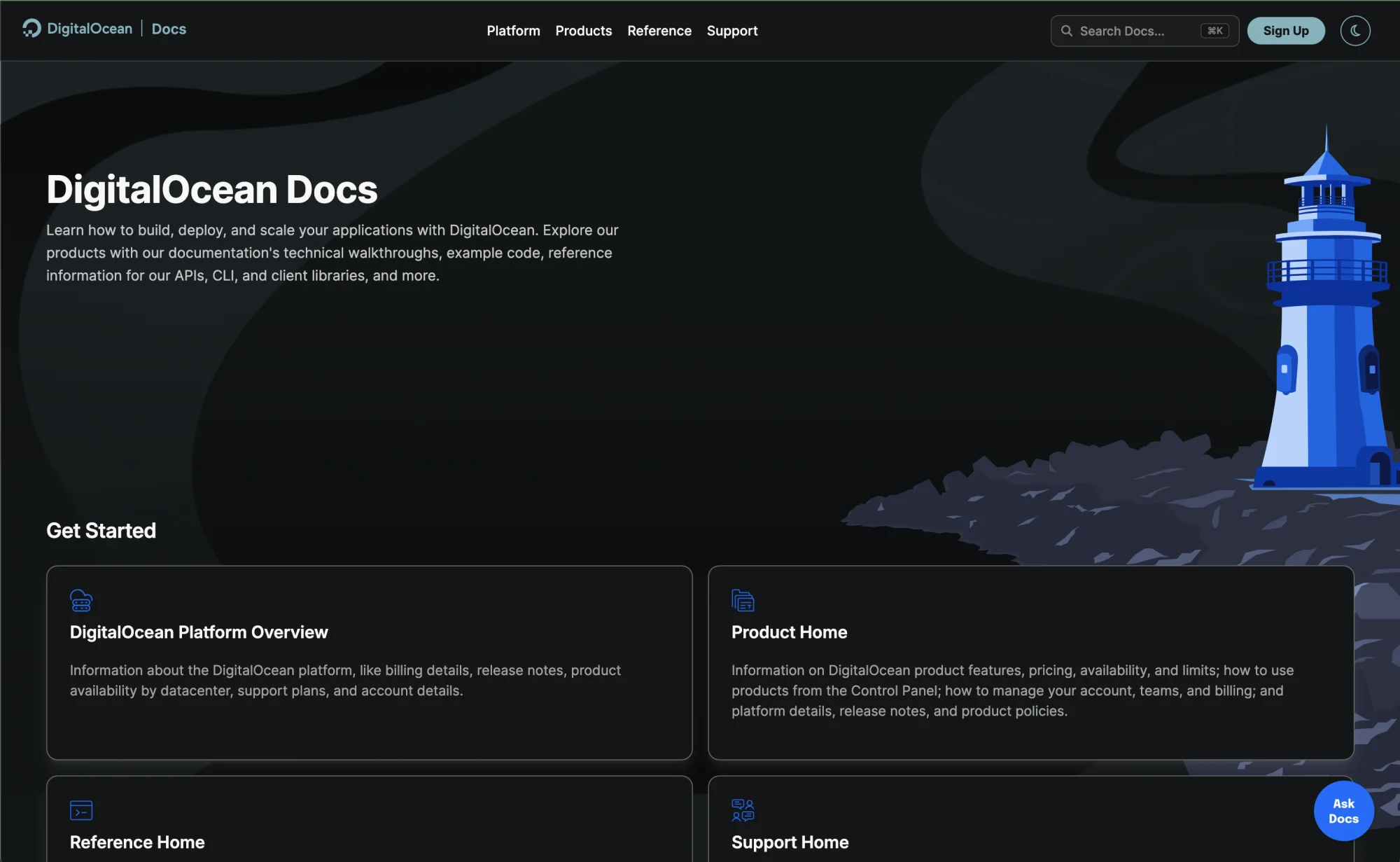
It’s tempting to look at the differences and assume they were all caused by the Hugo templates. But I wasn’t part of the implementation, so I don’t know which decisions resulted from technical constraints, prioritization, or other considerations.
What I can say is that the implementation was narrower than the original vision.
The visual language moved closer to DigitalOcean, while the structural connection I had identified as a central problem remained unresolved.
Impact & Learnings
What started as a request for visual consistency revealed a much larger opportunity to connect Product Documentation to the rest of DigitalOcean.
Seeing elements of the proposal implemented in 2025, two years after I finished the work, was the rewarding part. I wasn’t involved in the release, but the Documentation team kept advocating for the direction long after my assignment ended.
The project also showed me something I would do differently. I had deliberately explored concepts at different levels of ambition, but the handoff could have drawn a clearer line between what the existing Hugo templates could absorb, what required foundational changes, and what needed engineering investment that the team did not have.
I wouldn’t change the ambition of the designs. I would make the implementation priorities and dependencies explicit.
Design systems are about more than shared components, grids, and tokens. They are about creating foundations others can build on, even after the original designer has moved on, which only works if the intent and the tradeoffs are clear enough to carry forward.
Other projects
 Building a design system as an engineer Built the Evergreen design system from inside engineering. Password protected